Automated Hiring Workflows: 8 Types + How to Build Them Fast
Hiring today often feels slower than it should be.
You post a role, screen endlessly, follow up manually, and still struggle to keep candidates engaged through the process.
That’s where automated hiring workflows change the game.
They help you remove repetitive tasks, reduce delays, and create a smoother experience for both your team and candidates.
Instead of juggling tools and timelines, you build a system that runs consistently in the background.
In this guide, you’ll learn:
- What modern hiring automation actually looks like
- The 8 types you can implement
- How to build them quickly without overcomplicating things
Key Benefits of Automated Hiring Workflows for Modern Recruiting
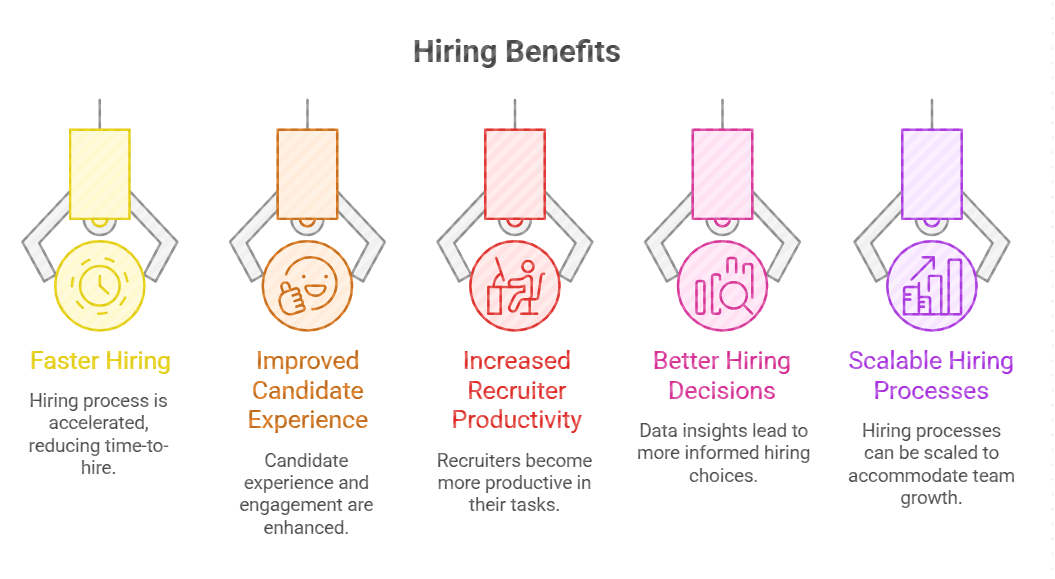
Automated hiring workflows help you move faster, reduce manual work, and maintain consistency across every step while improving candidate experience and overall hiring efficiency.
1. Faster Hiring and Reduced Time-to-Hire
When your hiring process depends on manual steps, delays naturally build up between each stage.
That’s where automated hiring workflows make a visible difference across your entire funnel.
From the moment a candidate applies, actions like resume screening, outreach, and interview scheduling happen instantly instead of waiting on recruiter bandwidth.
You’re no longer stuck in back-and-forth emails or slow shortlisting cycles.
This means you can move candidates from application to interview much faster while still maintaining quality, helping you close roles before top talent drops off or accepts other offers.
2. Improved Candidate Experience and Engagement
A slow or inconsistent hiring process often leaves candidates confused or disengaged midway.
With a structured recruitment workflow , every candidate receives timely updates, follow-ups, and next steps without delays.
This keeps communication clear and predictable throughout the journey.
As a result, you reduce drop-offs and create a more professional experience that makes candidates feel valued and informed at every stage.
3. Increased Recruiter Productivity
Recruiters often spend a large part of their day on repetitive tasks that don’t require strategic thinking.
By implementing a process-driven hiring system, tasks like follow-ups, scheduling, and status updates are handled automatically.
This frees up your time to focus on evaluating candidates and building meaningful relationships.
Instead of managing processes, you spend more time making better hiring decisions.
4. Better Hiring Decisions with Data Insights
When decisions rely only on intuition, it’s easy to miss patterns or overlook better candidates.
Modern recruitment systems provide real-time insights such as response rates, engagement metrics, and candidate scoring.
These insights help you understand what’s working and where improvements are needed.
With clearer visibility, you can make more consistent, data-backed hiring decisions across roles.
5. Scalable Hiring Processes for Growing Teams
As your hiring needs grow, manual processes quickly become difficult to manage.
Automated hiring workflows allow you to handle a higher volume of candidates without increasing workload.
Each step runs consistently, no matter how many applicants enter the pipeline.
This makes it easier to scale your hiring efforts while maintaining efficiency and candidate experience.
8 Types of Automated Hiring Workflows You Should Use
Once you understand the benefits, the next step is knowing where to apply automation in your hiring process.
Each workflow focuses on a specific stage, helping you remove delays and manual effort step by step.
Here are the most practical automated hiring workflows you can implement quickly to improve speed, consistency, and overall hiring outcomes.
1. Candidate Sourcing Automation Workflow
Finding the right candidates across platforms can take hours when done manually.
A candidate sourcing automation workflow uses AI and filters to search multiple platforms at once and identify relevant profiles based on your job requirements.
Instead of switching between tools, the system continuously scans and shortlists candidates for you.
It looks at skills, experience, and role fit to bring in better matches.
This reduces manual effort and speeds up the initial stage of hiring.
You always have a steady pipeline of qualified candidates, making it easier to move faster when a new role opens.
2. Resume Screening & Scoring Workflow
Reviewing every resume manually can slow down your hiring process and lead to inconsistent decisions.
A resume screening and scoring workflow automatically scans applications based on your job criteria.
It looks at skills, experience, keywords, and other requirements to evaluate each candidate.
Then it assigns scores and ranks profiles from most to least relevant.
This helps you quickly focus on top candidates without going through every resume.
You save time while maintaining consistency in screening.
In real hiring scenarios, this means faster shortlisting and better-quality candidates moving to the next stage.
3. Automated Candidate Outreach Workflow
Reaching out to candidates one by one can slow down your hiring process.
An automated candidate outreach workflow sends messages to multiple candidates at once using predefined templates.
It personalizes each message with details like name, role, or experience, so communication still feels relevant.
This helps you maintain consistency while saving time.
You don’t have to worry about missing or delaying outreach.
In real hiring scenarios, this means faster engagement and better response rates.
You can connect with more qualified candidates quickly without increasing manual effort or losing personalization.
4. Follow-Up and Reminder Workflow
It’s easy to miss email follow-ups when you’re managing multiple candidates and stages at once.
A follow-up and reminder workflow automatically sends messages based on predefined timelines or actions.
If a candidate doesn’t respond, the system triggers a reminder without manual effort.
It can also notify recruiters about pending tasks or next steps.
This keeps communication consistent and prevents gaps in the process.
In real hiring scenarios, this means fewer missed interactions and faster progress.
You don’t have to track everything manually, and your hiring process keeps moving smoothly without delays.
Suggested Reading:
Applicant Tracking System (ATS)5. Interview Scheduling Automation Workflow
Coordinating interview timings manually often leads to long email threads and unnecessary delays.
An interview scheduling automation workflow allows candidates to pick available time slots based on your calendar.
The system automatically shares options, confirms selections, and sends reminders before the interview.
This removes back-and-forth communication and reduces scheduling errors.
In real hiring scenarios, this means interviews get booked faster without constant coordination.
You also create a smoother experience for candidates who can choose times that work for them.
Overall, it speeds up the process while keeping scheduling simple and organized.
6. Candidate Engagement Workflow
Candidates often lose interest when they don’t hear back or feel unsure about their status.
A candidate engagement workflow keeps communication active throughout the hiring process.
It sends timely updates, reminders, and relevant information at each stage.
This ensures candidates always know what’s happening next.
In real hiring scenarios, consistent engagement reduces drop-offs and improves completion rates.
Candidates feel more confident and valued when communication is clear and regular.
This helps you maintain momentum and keeps strong candidates interested until the final decision.
7. Interview Feedback Collection Workflow
Delays in collecting feedback can slow down hiring decisions and create confusion across teams.
An interview feedback collection workflow automatically prompts interviewers to submit feedback after each interview.
Responses are gathered in a structured format and stored in one place.
This makes it easier to review and compare candidate evaluations.
In real hiring scenarios, faster feedback leads to quicker decisions and fewer bottlenecks.
It also ensures consistency in how candidates are assessed.
You avoid chasing interviewers and keep the hiring process moving efficiently.
8. Candidate Rejection & Communication Workflow
Delayed or unclear communication after decisions can harm your employer brand.
A candidate rejection and communication workflow ensures every candidate receives a timely response.
Messages are sent automatically based on outcomes, using clear and professional templates.
This removes the risk of missed communication.
In real hiring scenarios, candidates appreciate timely updates even when the outcome is negative.
It shows respect for their time and effort.
This helps you maintain a positive experience and build a stronger reputation in the talent market.
How Leelu.ai Helps You Build Automated Hiring Workflows
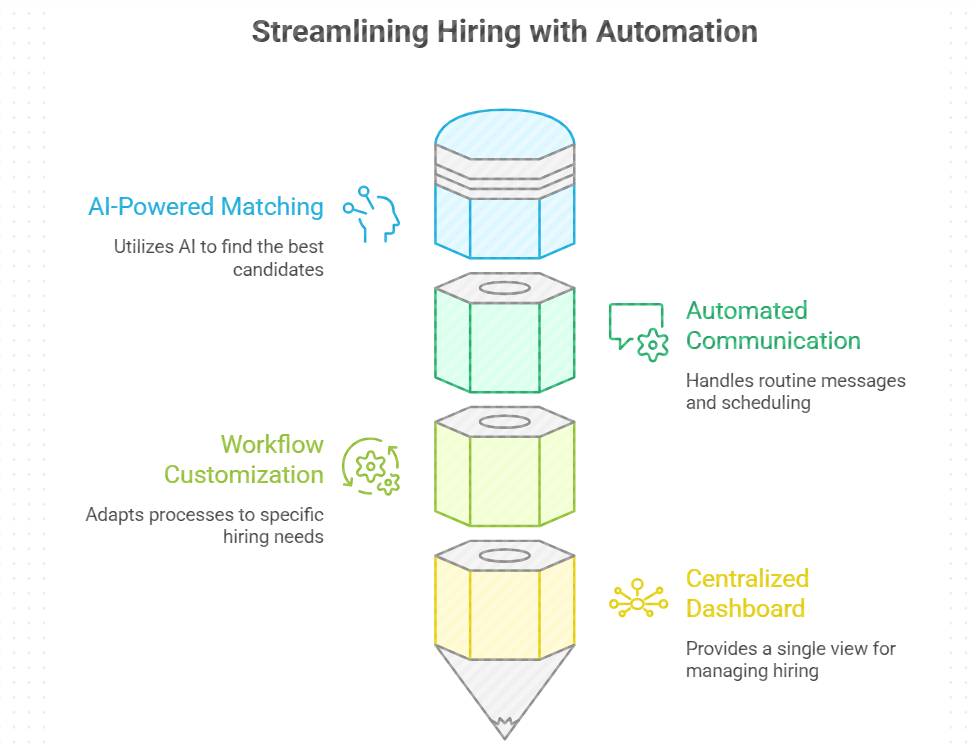
Leelu.ai helps you automate sourcing, screening, outreach, and scheduling in one place, making it easier to build, manage, and scale automated hiring workflows efficiently.
1. End-to-End Hiring Automation
Managing hiring across different tools often leads to gaps and inefficiencies between stages.
Leelu.ai connects the entire hiring cycle into one continuous workflow, from sourcing candidates to scheduling interviews.
This reduces dependency on multiple platforms and keeps everything running smoothly.
You get a complete system instead of disconnected processes.
2. AI-Powered Candidate Matching and Scoring
Identifying the right candidates quickly is one of the biggest challenges in hiring.
Leelu.ai uses AI to analyze and match candidates based on your job requirements, then scores them accordingly.
This helps you prioritize the most relevant profiles without manual filtering.
You spend less time searching and more time engaging the right talent.
3. Automated Communication and Scheduling
Consistent communication is critical, but managing it manually slows everything down.
Leelu.ai automates outreach, follow-ups, and responses while keeping interactions personalized.
It also handles interview scheduling by syncing calendars and confirming slots instantly.
This keeps your hiring process moving without constant coordination.
4. Workflow Customization for Different Hiring Needs
Not every role or hiring process follows the same structure, and rigid systems often create friction.
Leelu.ai lets you customize automated hiring workflows based on role type, hiring volume, and process complexity.
You can adjust steps, triggers, and actions without rebuilding everything from scratch.
This flexibility helps your team adapt quickly as hiring needs change.
5. Centralized Dashboard for Workflow Management
When your hiring process is spread across tools, it becomes difficult to track progress clearly.
Leelu.ai provides a centralized dashboard where you can monitor candidates, workflows, and communication in one place.
This gives you complete visibility and control over every stage.
You manage your entire hiring pipeline without switching between systems.
Suggested Reading:
A Guide to Predictive Hiring Analytics [+11 Ways to Boost Quality Hire]Conclusion
Automated hiring workflows help you remove delays, reduce manual work, and create a more consistent hiring process from start to finish.
The key is keeping implementation simple so you can move faster without overcomplicating your system.
When everything works together seamlessly, your team hires better and quicker.
This is where Leelu.ai fits naturally, helping you build, run, and scale automated hiring workflows without switching tools or adding unnecessary complexity.
Frequently Asked Questions
1. How long does it take to set up automated hiring workflows?
It depends on your hiring process complexity. Simple automated hiring workflows can be set up in a few hours, while more advanced workflows with multiple stages, integrations, and conditions may take a few days to fully configure and test.
2. Does hiring automation replace recruiters?
No, hiring automation does not replace recruiters. It handles repetitive tasks like resume screening, follow-ups, and scheduling, allowing recruiters to focus on strategic activities such as candidate evaluation, relationship building, and making informed hiring decisions.
3. Can small teams benefit from recruitment automation systems?
Yes, small teams benefit significantly from recruitment automation systems. These systems reduce manual workload, streamline processes, and enable teams to manage higher candidate volumes efficiently without needing additional hiring resources or expanding their recruitment team.
4. Are hiring automation systems difficult to maintain?
Hiring automation systems are generally easy to maintain once implemented. Most require only occasional updates, such as refining workflows, adjusting candidate criteria, or improving communication templates based on performance data and evolving hiring needs.
5. How do hiring automation systems maintain candidate personalization?
Modern hiring automation systems maintain personalization by using dynamic candidate data such as name, role, and experience. This allows tailored communication at scale, ensuring candidates receive relevant messages while still benefiting from the efficiency of automation.