10 Candidate Follow Up Email Templates That Get Replies
Following up after sending an email can feel awkward, especially when you’re not sure what to say or how to say it without sounding pushy.
You want a reply, but you also want to stay professional and respectful of the other person’s time.
That’s where the right follow-up email makes all the difference.
In this guide, you’ll discover:
- How to write follow-ups that actually get responses
- When to send them for better results
- 10 proven follow-up email templates you can start using right away
Why Candidate Follow Up Emails Matter in Modern Hiring
Hiring today is no longer just about posting a job and waiting.
Candidates have options, shorter attention spans, and higher expectations from your communication.
That’s why your follow-up emails are not just reminders, they are a key part of your hiring strategy.
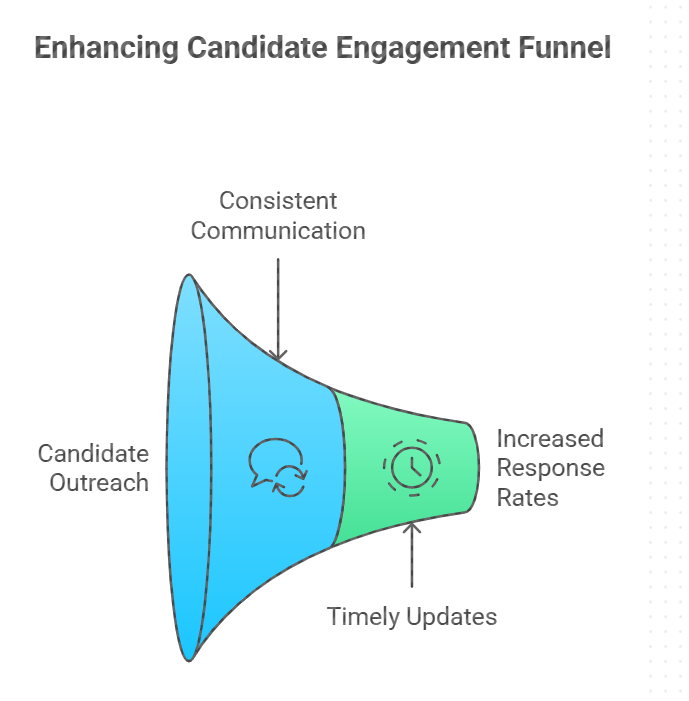
1. Candidate Outreach Increases Response Rates
Most candidates don’t respond to the first message, not because they’re uninterested, but because they’re busy or distracted.
A well-timed follow-up brings your message back to their attention without starting from scratch.
When you reach out again with clarity and relevance, you naturally increase your chances of getting a reply.
2. Consistent Communication Keeps Candidates Engaged
Once a candidate shows interest, silence can quickly break that momentum.
If you don’t stay in touch, they may lose interest or move forward with another opportunity.
Regular follow-ups help you stay present in their mind and keep the conversation moving forward.
You can also explore proven candidate engagement strategies to further improve how you connect and communicate with candidates throughout the hiring process.
3. Timely Updates Build Trust and Transparency
Waiting without updates is one of the biggest frustrations for candidates.
Even a short follow-up that shares progress or timelines can make a big difference in how they perceive your process.
When you communicate consistently, you show that you respect their time and value their interest.
4. Strong Communication Improves Candidate Experience
Every interaction you have with a candidate shapes their overall experience with your company.
Clear, timely, and thoughtful follow-ups make your process feel organized and professional.
Over time, this not only helps you close candidates faster but also strengthens your employer brand.
When to Send Candidate Follow Ups (Best Timing Guide)
Now that you know why follow-ups matter, the next question is timing.
Because even the best message can get ignored if it’s sent too early or too late.
The goal is simple: stay relevant without feeling intrusive.
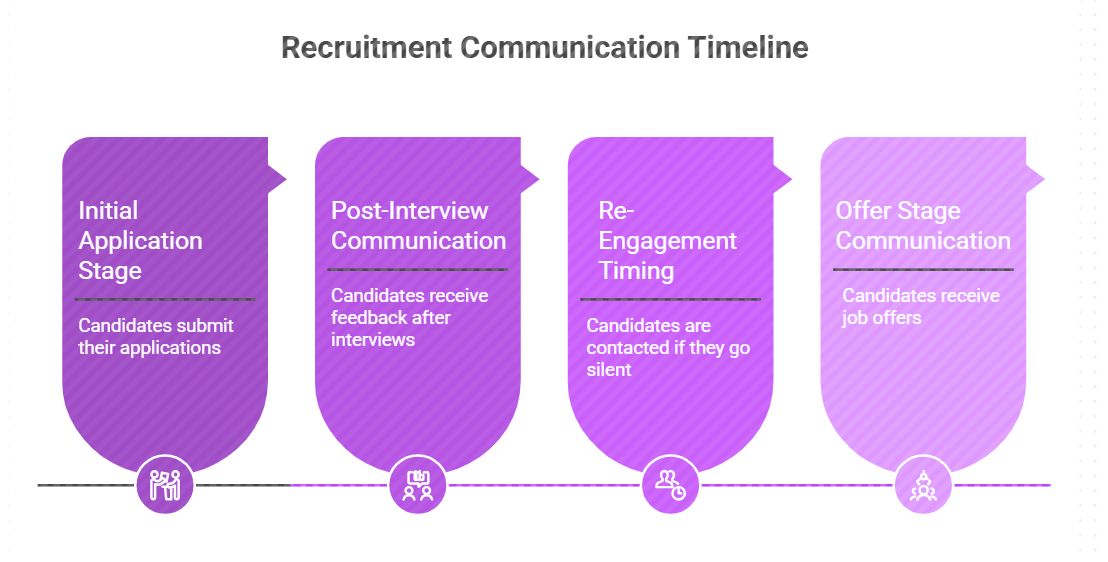
1. Initial Application Stage Timing
Right after a candidate applies, they’re most attentive and curious about what happens next.
This is your window to acknowledge their application and set expectations clearly.
Send your first follow-up within 24–48 hours to keep the momentum alive and show that your process is active.
2. Post-Interview Communication Timing
After an interview, candidates are usually waiting and evaluating their options.
Delays here can create uncertainty and weaken their interest in your role.
A follow-up within 24 hours works best, even if it’s just to share the next steps or timeline.
3. Re-Engagement Timing for Silent Candidates
Sometimes candidates go quiet, and it’s easy to assume they’re no longer interested.
But often, they’re just busy or missed your earlier message.
A gentle follow-up after 3–5 days helps you reconnect without sounding pushy or repetitive.
4. Offer Stage Communication Timing
At the offer stage, timing becomes even more critical because decisions happen fast.
If there’s a gap in communication, candidates may start second-guessing or consider other offers.
Following up within 24 hours of sending the offer letter helps you address questions quickly and keep the process moving forward.
Suggested Reading:
AI Virtual Recruiter for Candidate Sourcing & Hiring10 Candidate Follow Up Email Templates That Get Replies
Now that you understand the timing, let’s move into what to actually say.
Because the right structure and tone can turn a simple follow-up into a reply.
You can use these templates as they are or tweak them based on your role and company voice.
1. Application Acknowledgment Template
When a candidate applies, they’re looking for confirmation and clarity.
A quick response here sets the tone for your entire hiring process.
Email:
Subject: Thanks for your application Thanks for your application
Hi {{Candidate Name}},
Thank you for applying for the {{Job Title}} role at {{Company Name}}.
We’ve received your application and our team is currently reviewing your profile.
We’ll keep you updated on the next steps soon.
Best regards,{{Your Name}}
2. No Response Reminder Template
Sometimes candidates miss your first message, not ignore it.
A gentle nudge can bring the conversation back on track.
Email:
Subject: Just checking in Just checking in
Hi {{Candidate Name}},
I wanted to quickly follow up on my previous message regarding the {{Job Title}} opportunity.
I’d love to hear your thoughts and see if you’re open to a quick conversation.
Let me know what works best for you.
Best,{{Your Name}}
3. Post-Interview Check-In Template
After an interview, candidates are often waiting and evaluating silently.
A check-in keeps them engaged and reassured.
Subject: Great speaking with you Great speaking with you
Hi {{Candidate Name}},
It was great speaking with you about the {{Job Title}} role.
I wanted to check in and let you know we’re currently reviewing feedback from the team.
We’ll share the next steps with you shortly.
Thanks again for your time,{{Your Name}}
4. Interview Scheduling Reminder Template
Scheduling delays can slow down your entire hiring funnel.
A simple reminder helps move things forward quickly.
Email:
Subject: Interview scheduling reminder Interview scheduling reminder
Hi {{Candidate Name}},
Just a quick reminder to schedule your interview for the {{Job Title}} role.
You can pick a time that works best for you using the link below:{{Scheduling Link}}
Looking forward to speaking with you.
Best,{{Your Name}}
5. Feedback Request Template
Candidate feedback helps you improve your hiring process over time.
It also shows that you value their experience, even if they don’t move forward.
Email:
Subject: We’d love your feedback We’d love your feedback
Hi {{Candidate Name}},
Thank you for taking the time to interview with us.
We’d really appreciate your feedback on your experience so far.
Your input helps us improve and create a better hiring process.
Thanks in advance,{{Your Name}}
6. Final Round Update Template
At later stages, candidates expect clarity and faster communication.
Keeping them informed here builds confidence in your process.
Email:
Subject: Update on your application Update on your application
Hi {{Candidate Name}},
I wanted to update you that you’ve successfully moved to the final round for the {{Job Title}} role.
Our team will reach out shortly to coordinate the next steps.
Congratulations and looking forward to continuing the process.
Best,{{Your Name}}
7. Offer Reminder Template
Offers can lose momentum if there’s no follow-up.
A reminder helps address doubts and keeps the decision moving.
Email:
Subject: Following up on your offer Following up on your offer
Hi {{Candidate Name}},
I wanted to check in regarding the offer we shared for the {{Job Title}} role.
Please let me know if you have any questions or need clarification on any details.
We’d be happy to help you make an informed decision.
Best regards,{{Your Name}}
8. Missing Information Request Template
Incomplete details can slow down your hiring process.
A clear and polite request helps you move forward faster.
Email:
Subject: Additional details required Additional details required
Hi {{Candidate Name}},
We’re currently reviewing your application and need a few additional details to proceed.
Could you please share the following information:{{Required Details}}
Once we have this, we’ll continue with the next steps.
Thanks,{{Your Name}}
9. Rejection Communication Template
Rejections are part of hiring, but how you communicate them matters.
A thoughtful message leaves a positive impression.
Email:
Subject: Update on your application Update on your application
Hi {{Candidate Name}},
Thank you for your interest in the {{Job Title}} role and for taking the time to go through our process.
After careful consideration, we’ve decided to move forward with other candidates.
We truly appreciate your time and wish you the best in your job search.
Best regards,{{Your Name}}
10. Talent Pool Re-Engagement Template
Good candidates shouldn’t be forgotten just because timing didn’t work earlier.
Re-engaging them can save you time and effort in future hiring.
Email:
Subject: New opportunity for you New opportunity for you
Hi {{Candidate Name}},
I hope you’ve been doing well.
I wanted to reach out because we have a new opportunity that aligns well with your profile.
Would you be open to exploring this role? I’d be happy to share more details.
Looking forward to hearing from you,{{Your Name}}
Suggested Reading:
11 Best Letter of Recommendation Templates for 2026Best Practices for Writing Candidate Follow Up Messages That Get Replies
Now that you have templates in place, the real impact comes from how you use them.
Because small tweaks in tone, clarity, and structure can significantly improve response rates.
Let’s break down what actually makes a follow-up message work.
1. Keep Messages Short and Clear
Candidates don’t have the time or patience to read long emails.
If your message feels heavy or unclear, they’re more likely to skip it.
Focus on one purpose per email and keep your message easy to scan and understand quickly.
2. Personalization Improves Engagement
Generic messages are easy to ignore because they don’t feel relevant.
When you mention something specific about the candidate or their role, it instantly feels more human.
Even small details like their experience, skills, or interview discussion can make your follow-up stand out.
3. Clear Call-to-Action Drives Responses
If your email doesn’t tell the candidate what to do next, they may not respond at all.
Clarity removes hesitation and makes it easier for them to take action.
Use simple and direct asks like scheduling a call, sharing availability, or confirming interest.
4. Friendly Tone Builds Better Connections
Your tone shapes how candidates perceive both you and your company.
A message that feels cold or robotic can create distance, even if the content is correct.
Keep your tone warm, respectful, and conversational so candidates feel comfortable replying.
Common Mistakes to Avoid in Candidate Communication
Even with the right templates and timing, small mistakes can reduce your chances of getting a response.
Most of these issues are easy to fix once you’re aware of them.
Let’s look at the common ones that can quietly hurt your hiring communication.
1. Too Many Messages Can Reduce Engagement
Following up is important, but overdoing it can have the opposite effect.
If candidates feel overwhelmed by constant emails, they may start ignoring all of them.
Space out your follow-ups thoughtfully so you stay relevant without becoming intrusive.
2. Generic Messaging Reduces Impact
When your message feels like it was sent to everyone, it loses its effectiveness.
Candidates can easily tell when there’s no effort to make the message relevant to them.
Adding even a small layer of personalization can make your communication feel more intentional and engaging.
3. Unclear Next Steps Cause Confusion
If candidates don’t know what to do after reading your email, they’re likely to delay responding.
Uncertainty creates friction, and friction leads to silence.
Always make the next step clear so candidates can respond quickly and confidently.
How AI Tools Improve Candidate Communication
By now, it’s clear that consistent and thoughtful communication takes effort.
But when you’re handling multiple roles and candidates, doing this manually becomes difficult to scale.
That’s where AI tools start to make a real difference in your hiring workflow.
1. Automation Tools Save Time and Improve Consistency
Manually sending follow-ups, tracking responses, and remembering timings can quickly become overwhelming.
This often leads to missed follow-ups or inconsistent communication across candidates.
AI-powered automation handles repetitive tasks like outreach, reminders, and updates, so every candidate gets timely communication. This is where recruitment automation plays a key role in improving efficiency and consistency at scale.
2. AI Recruiting Tools Enable Personalization at Scale
Personalization works, but doing it manually for every candidate is not practical.
That’s why most recruiters end up sending generic messages, even when they know it’s not ideal.
AI tools can tailor messages based on candidate data, role requirements, and past interactions. Many modern AI candidate sourcing tools also support personalized outreach, helping you improve response rates without increasing manual effort
Conclusion
Getting replies from candidates isn’t about sending more emails, it’s about sending the right ones at the right time.
When your follow-ups are clear, timely, and personalized, you naturally create better conversations and stronger engagement.
Tools like leelu.ai help you automate follow ups, personalize communication, and keep candidates engaged throughout the hiring process.
As you apply these templates and best practices, you’ll notice fewer drop-offs, faster responses, and a more efficient hiring process overall.
Frequently Asked Questions
1. How many follow-ups should you send to a candidate?
You should ideally send 2 to 3 follow ups spaced a few days apart.
This balance keeps you persistent without overwhelming the candidate, giving them enough time to respond while keeping your opportunity visible and relevant.
2. What is the best subject line for candidate communication?
Your subject line should be clear, simple, and directly related to the role or next step.
Avoid vague or overly creative lines, and focus on relevance so candidates instantly understand the purpose and feel encouraged to open your message.
3. Should candidate messages include salary details?
In early communication, focus more on engagement and interest rather than detailed compensation.
You can introduce salary details once the candidate shows intent, ensuring the conversation flows naturally without overwhelming them too early in the process.
4. How do you manage communication across time zones?
Always consider the candidate’s location before sending messages.
Scheduling emails during their working hours increases visibility and response rates, while showing respect for their time and making your communication feel more thoughtful and relevant.
5. Can automation maintain personalization in candidate communication?
Yes, modern AI tools use candidate data like role, skills, and interactions to personalize messages automatically.
This allows you to scale communication while still keeping messages relevant, human, and tailored to each candidate’s context without manual effort.